What changed, what to check, what shipped. For the people who run Zscaler. | |||||||||||||||||||||||||
|
A note from Daniele From this issue on, the Digest has a fixed rhythm: the first week of every month, the month before, read for you. What struck me in September is that AI agents got a governed way into the Zscaler console. Zscaler announced Agentic Operations: you connect the AI assistant of your choice, an admin authorises it, and its access is logged. I like the direction. But an agent reads the same configuration you do, and if the configuration is wrong, the agent is confidently wrong. Knowing what your rules really do matters more with agents, not less. On our side, Troubleshooting is now generally available in ZHERO: who can reach what, and why, on one screen. More in From ZHERO. Reply and tell me what you want more of next month. Daniele | |||||||||||||||||||||||||
|
WHAT CHANGED AI agents get a governed door into Zscaler. Zero Trust Exchange Agentic Operations (14 Sep) lets the AI assistant your team already uses work with Zscaler through a hosted MCP server: the client is authorised by an admin, the user signs in with a role, access can be revoked, and the whole authorisation lifecycle is logged. It starts as an early access programme focused on access investigation and policy validation. Next to it, the ZDX Agent (30 Sep) answers whether a bad user experience comes from the device, the network, the Zero Trust Exchange or the app, and Risk360 adds agentic AI (15 Sep). Practical reading: before you let an agent near the console, decide which role it gets. "Read-only investigation" and "change policy" are not the same request. The console is consolidating, and the admin model with it. Role management is becoming one page for all products: Unified RBAC for Internet & SaaS, Private Access and Digital Experience (21 Sep), enabled through your account team; once you switch, the old ZIA role page is deprecated. And the original Experience Center navigation goes away on 29 October: the new one has been the default since 21 September. Nothing changes in what the console does, everything changes in where things are. If you are moving to unified roles, it is the right moment to ask who really needs which role, product by product. Client Connector changes its lifecycle. Client Connector 5.0 for Windows (29 Sep, limited availability) brings a redesigned app with plain-language guidance for users, the Wi-Fi name (SSID) as a trusted network condition, and TLS 1.3, and it drops Windows 32-bit. At the same time Zscaler announced the 2027 long-term support versions (1 Oct): 4.9 on Windows, 4.8 on macOS, 4.2.2 on Linux, effective 30 April 2027, with critical fixes for up to twelve months and no new features. Practical reading: decide now which device groups follow the latest version and which stay on LTS, and write it down in the app profiles' upgrade settings instead of in someone's head. Also worth a line: the ThreatLabz 2026 Ransomware Report counts 896 TB of stolen data, up 275% in a year: the number your board will quote this quarter. | |||||||||||||||||||||||||
|
ACTION NEEDED Advisories worth a calendar entry. All from the Zscaler Trust Portal and release notes.
| |||||||||||||||||||||||||
|
RELEASE RADAR Every Zscaler release of September and the first days of October, by product.
Worth your attention Unified roles, Client Connector 5.0 and the File Type Control fix are covered above. The others worth a look:
| |||||||||||||||||||||||||
|
WHAT TO CHECK Do your File Type Control rules do what you think? Zscaler fixed an evasion of File Type Control in the cloud this month. The more common gap is closer to home: a rule that blocks archives sits below a broader rule that already allowed them, a file type covers more extensions than its name says, or the same file type behaves one way in File Type Control and another in Sandbox and DLP. None of that shows up as an error. The rule is there, and it never runs. How to check it by hand. In the console open Policy > File Type Control and read the rules top to bottom, because the first match wins. For each rule note the file types, the users, groups and locations it applies to, and the action. Then ask, rule by rule: is there a rule above it that matches the same traffic first? For each file type you rely on, open its definition to see the extensions it covers, and repeat the exercise in Sandbox and DLP, where the same file type may be used again. A spreadsheet with one row per rule and one column per criterion makes the overlaps visible. The shortcut. In ZHERO a file type is an entity: its card shows the extensions it covers and every File Type Control, Sandbox and DLP rule that uses it, with the rules that can never match shown as unreachable. Unreachable policy detection flags the rules that sit behind a broader one, across the whole policy. 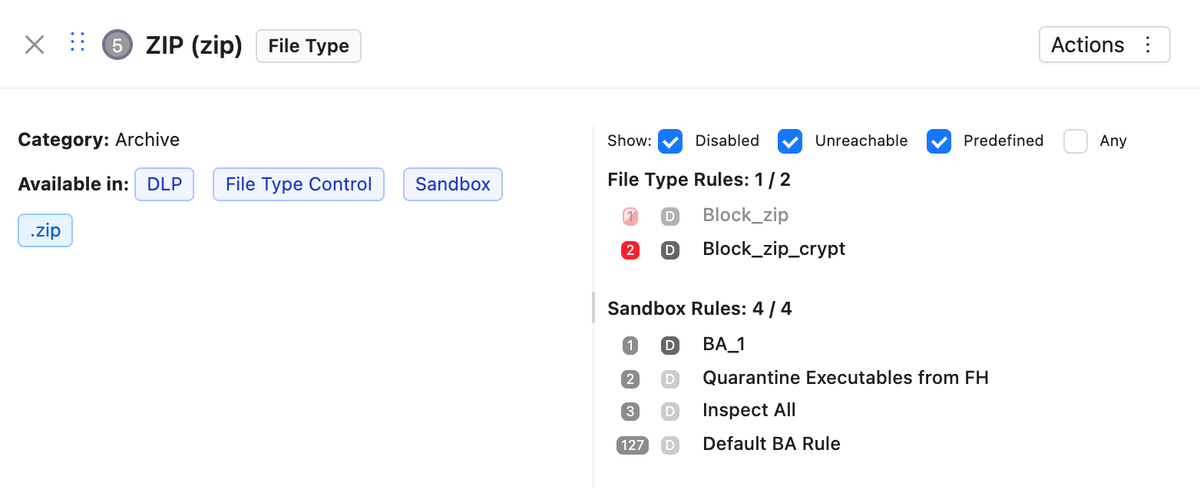
| |||||||||||||||||||||||||
|
FROM THE BLOG
| |||||||||||||||||||||||||
|
FROM ZHERO Five releases of ZHERO since the last issue. The two that change what you can do: v3.2.0 (24 Sep), Troubleshooting. For each scenario (who, from where, to what) ZHERO says whether the traffic is reachable or blocked, and by which engine, walking the rules in their real order across ZIA and ZPA. When the answer depends on a condition it becomes an estimate, weighed on the ZIA side by your Client Connector fleet and the user's own logs. For the vague tickets, the log investigation runs the reads one after another and builds one timeline with diagnosis cards; with only a day to go on, a heatmap of the user's day shows where to look. View Logs opens the logs of any user, location, category or rule in a floating panel over the console, and HAR files are analysed in the browser. Troubleshooting is generally available with the full licence; here it is in two minutes. 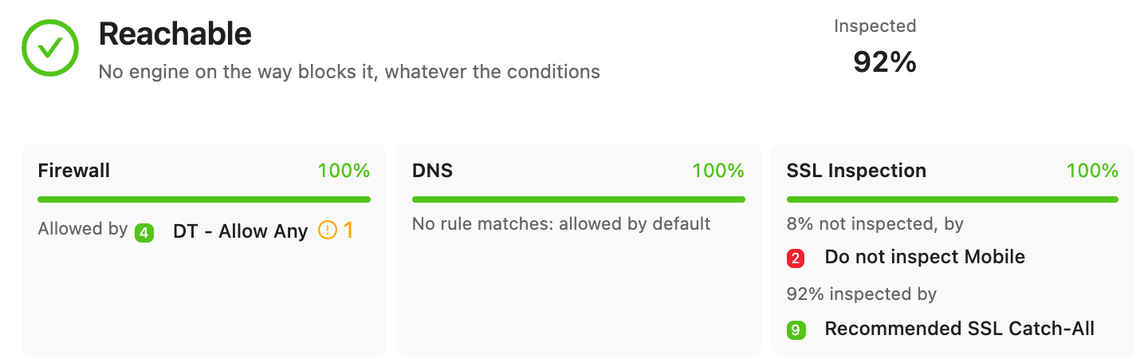
v3.1.28 (12 Sep), six months of inspection. The SSL Inspection page opens a trend of up to 180 days: drag across the chart to read the rate over any period, and switch on a weekly average weighted by traffic to tell a real change from daily noise. And a trial now shows the real posture score of its own tenant. Also shipped: v3.2.42 (28 Sep) makes every rule in the troubleshooting path say what it decides and adds readable DLP thresholds; v3.2.55 (2 Oct) explains when ignoring a finding will not move the score yet and shows who created each to-do; v3.2.56 (3 Oct) keeps ZHERO connected through long Experience Center sessions. Full notes in the changelog. | |||||||||||||||||||||||||
|
Before you go If one of the checks above turned up something you would rather not have found, bring your tenant to a demo: in about an hour we read it together, on your configuration or on one of ours. Pick a time here. Or just reply to this email. It lands in my inbox, not in a queue. Daniele Tieghi | |||||||||||||||||||||||||
| |||||||||||||||||||||||||
|
You receive The ZHERO Digest #002 because you subscribed at zhero.ai or asked ZHERO to keep you posted. One email a month, no automation in between. ZHERO Srl, Via Friuli 8/B, 20135 Milano, Italy |
